SwarmMarshal · every inbox and chat you own, on your machine

Ask ten years of your own messages: “What did the contractor quote me last fall?”

Every promise, price, deadline, and excuse anyone ever sent you is already sitting in your email and texts. SwarmMarshal makes that history answer back — in plain English, in seconds, with the exact message attached as proof.

A cloud assistant can't read your work mail or your iMessage. SwarmMarshal reads everything you own, keeps it all on your machine — and still texts you answers on your phone.

Everything one client email · iMessage · chat
Grounded every answer cited click to verify
Local on your machine Windows · Mac
Assistant — your communication history 3 accounts connected
You: “What did we agree with Acme about delivery in March?” scope: Acme · last 90 days asked
Assistant: “Acme agreed to ship by March 28, then asked to move it to April 11.” 2 emails · 1 calendar invite · exact quotes kept separate from inference sources attached
→ Open “Re: Q1 delivery schedule” — Mar 14 the real message behind the answer click to verify
0.1.0release
Previewstatus
Free public preview is openpulse
The problem

You already have the answer. You just can't find it.

The thing you need was said in an email, a thread, or a text months ago. You remember the gist, not the words — so it's faster to ask the other person again than to dig for it. SwarmMarshal makes the history answerable.

"I know this was discussed — I just can't find the email."

The bind: It came up in a meeting, an email thread, maybe a text. You remember the topic but not the exact words, date, or who sent it.

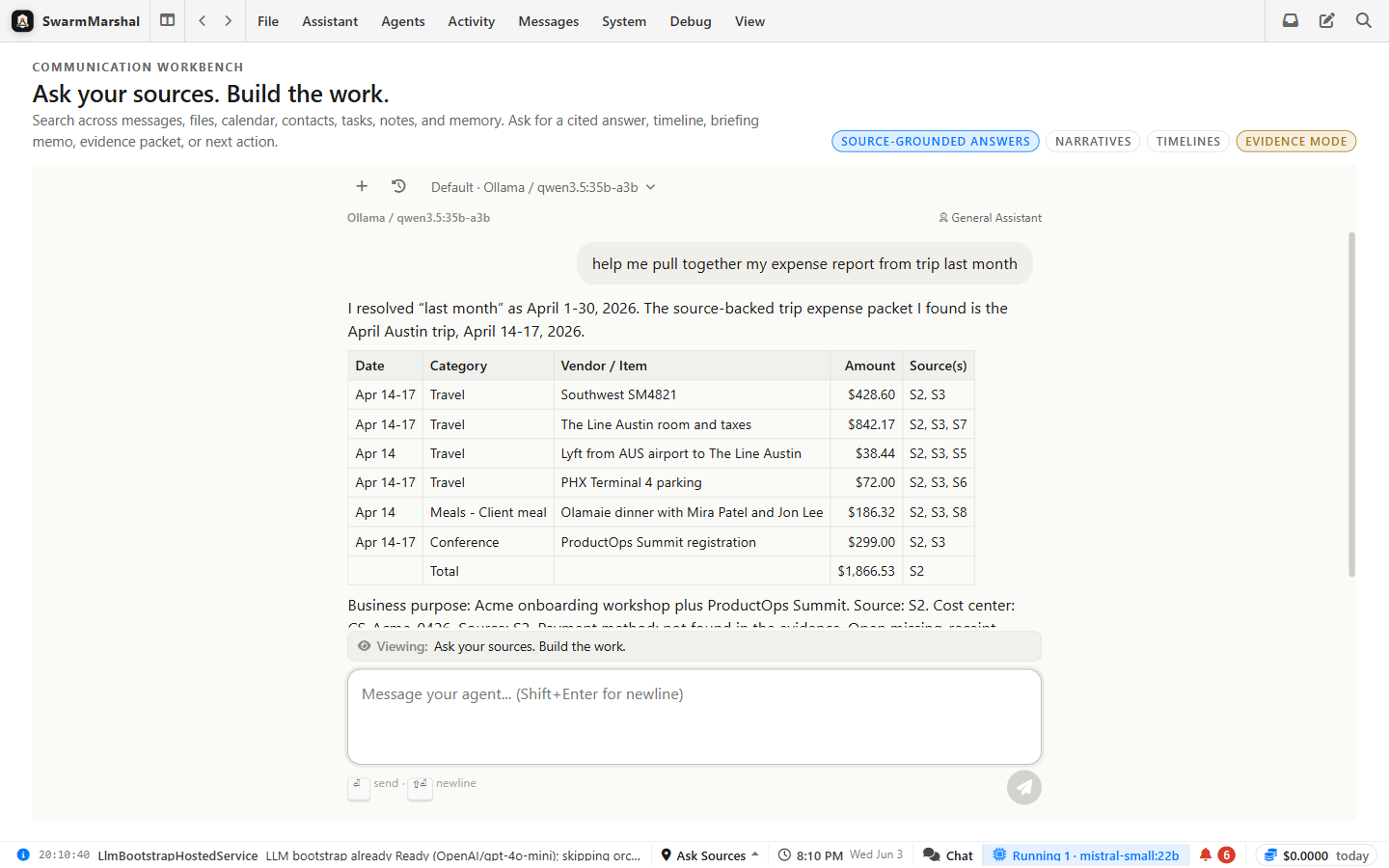
SwarmMarshal: SwarmMarshal searches by meaning, not just keywords. Type what you remember and it surfaces the real message — with a link so you can open and verify it.
"Someone says we agreed to something I don't remember agreeing to."

The bind: A vendor, client, or colleague claims something was promised or approved in a message. You need to know what the record actually says.

SwarmMarshal: SwarmMarshal searches the relevant thread, date range, or contact history and builds a source-linked timeline of what was actually said and when.

"I need to write this up — but I want it based on what actually happened."

The bind: A memo, summary, or project recap that comes only from your memory misses things. You need a draft that someone can trace back to the real record.

SwarmMarshal: The assistant reads the relevant threads, drafts the document, and puts a link to the source email next to every important claim.

"I spend too much time reconstructing history before I can do the real work."

The bind: A call is in 20 minutes. A dispute is heating up. You need the backstory fast — without rereading 200 emails from scratch.

SwarmMarshal: Ask SwarmMarshal for a brief on the person, thread, or project. It reads everything and gives you the key points with source links in under a minute.

How it works

Ask in plain English. Every claim links to the message it came from.

No copy-pasting context, no prompt engineering, no plausible-sounding guesses. SwarmMarshal searches your actual records before it answers — and shows its sources.

Ask

Type the question the way you'd say it. Scope it to a person, thread, folder, project, or date range — or just ask across everything.

It searches your real history

Hybrid keyword + meaning search across email, chat, files, calendar, tasks, and contacts — including the things you'd never find by exact wording.

You get a sourced answer

A direct answer with a link to the exact email or message behind every important claim. Open the original before you rely on it. Inference is labeled, not hidden.

What people actually do with it

From a vague memory to a document you can stand behind.

The assistant doesn't just answer — it turns months of scattered messages into the thing you actually needed: a brief, a timeline, a packet.

Get the backstory in 60 seconds

The situation: You have a call or meeting and need to know the history — what was promised, what's unresolved, what actually happened.

What it does: Tell SwarmMarshal who or what the meeting is about. It reads relevant emails, calendar context, and prior decisions, then writes a short brief with the key points and source links.

You stay in control: You read the brief, open any message you want to verify, and walk into the meeting knowing the real story.

Ask in plain English Key points + sources Open any source message Ready in under a minute

Build the timeline for a dispute

The situation: Something went wrong and you need to know exactly what was said, promised, or agreed — and when.

What it does: Pick the person, thread, or date range. SwarmMarshal reads every related message, extracts dates, claims, promises, and deadlines, and builds a chronological timeline with links back to each source.

You stay in control: You review the timeline, open the messages behind each entry, and produce a document you can share — with the original emails attached, not just a summary.

Pick your scope Dated events from real messages Source link per entry Shareable output
Everything it can do

One workbench over your whole communication history.

Email and chat are just the source material. The value is everything you can ask of it afterward.

The foundation

A great inbox is the point, not an afterthought.

You can't trust an answer if you don't trust the inbox it came from. SwarmMarshal is a fast, polished email and chat client first — and every message that flows through it becomes searchable history you can ask about later.

Every account, one place

Gmail, Outlook/Microsoft, and IMAP, plus Apple Messages, Slack, Telegram, and Discord — read, compose, search, and organize them together.

Your data, on your machine

Accounts sync to local storage on your own computer. Nothing is hosted in someone else's cloud — your messages stay yours.

Commitments don't slip

Deadlines and promises buried in email surface as calendar items and tasks — still linked to the message they came from.

Your day, briefed

It starts your day, travels with you, and learns who you are.

The workbench isn't only for questions you remember to ask. Every morning it builds a briefing from your real calendar, commitments, and mail — and it's reachable from your pocket all day.

A real morning briefing

Generated on your schedule from your actual calendar, deadlines, commitments, and unread mail — every fact linked to the message it came from. On the Today dashboard before your coffee's ready.

Your assistant, in your pocket

Connect a private Telegram bot and text your assistant from anywhere — ask your history, check a commitment, get the briefing pushed to your phone. Owner-gated, and your data never leaves your machine; the bridge only carries the conversation.

It learns about you — with receipts

From your mail and chats it builds a durable memory: who matters, what you prefer, what you're working on. Every memory shows its source, and you can correct or delete any of it from the Today page.

Your AI, your rules

Sensitive work never has to leave your machine.

SwarmMarshal routes each task to the right model — private things to a model running locally on your computer, the heavy lifting to a frontier cloud model — and you set the budget. It's not one AI for everything; it's the right one for each job.

Private stays local

Mark anything sensitive local-only and it's guaranteed not to leave your machine — even when a cloud model would be cheaper or faster. You can run fully local if you want to.

Right model for the job

Fast, cheap local models handle routine sorting and classification; a frontier cloud model does the high-stakes drafting and analysis. Each task picks its own tier automatically.

Costs you control

Keep your premium cloud budget for the work that needs it. A spend guard caps the bill before it surprises you, and per-task routing keeps cheap work cheap.

Finished work

Deliverables land in a Library — each with a receipt.

Ask for a brief, a timeline, or an evidence packet and it doesn't vanish into chat scrollback. Every artifact the assistant produces is versioned, collected in one Library, and stamped with the sources and model behind it.

One Library, every deliverable

Documents, timelines, tables, code, and evidence packets from every conversation — searchable and filterable in one place, with full version history.

A receipt on every artifact

Each version records the messages it was built from and the model that wrote it. You can trust a document because you can audit it.

Pick up where you left off

Open any artifact and jump straight back into the conversation that produced it. Ask for the next revision — the history stays attached.

The app

A real desktop app — these are actual screens.

Your accounts sync to local storage. You pick which model interprets each task, including fully local options. No concept deck — this is the app.

Ask your history

Ask your history

Ask a question in plain English; the assistant answers from your real messages with a link to each source.

Unified inbox

Unified inbox

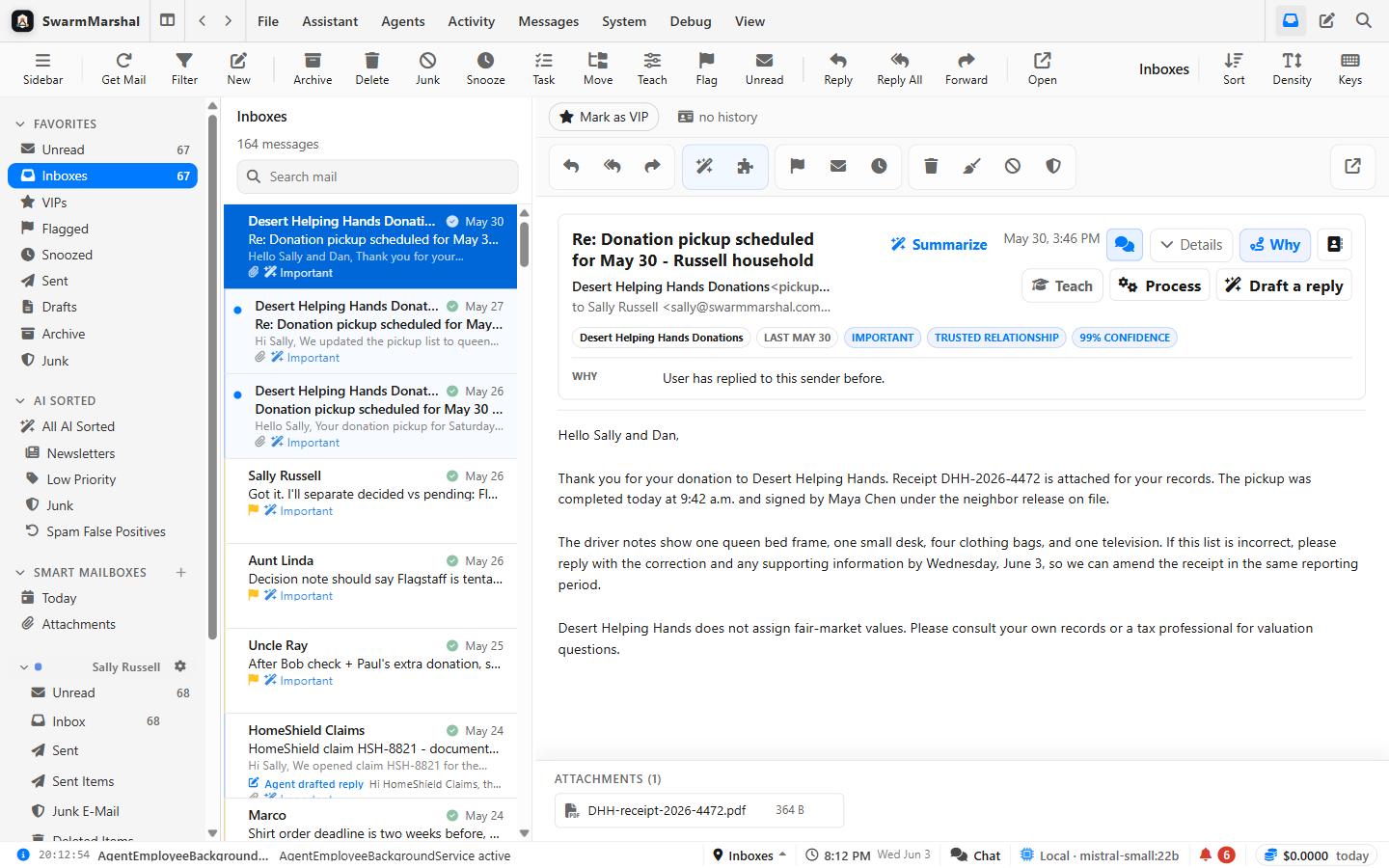
Email, Telegram, Slack, Discord, and Apple Messages in one fast, clean client — every message becomes searchable history.

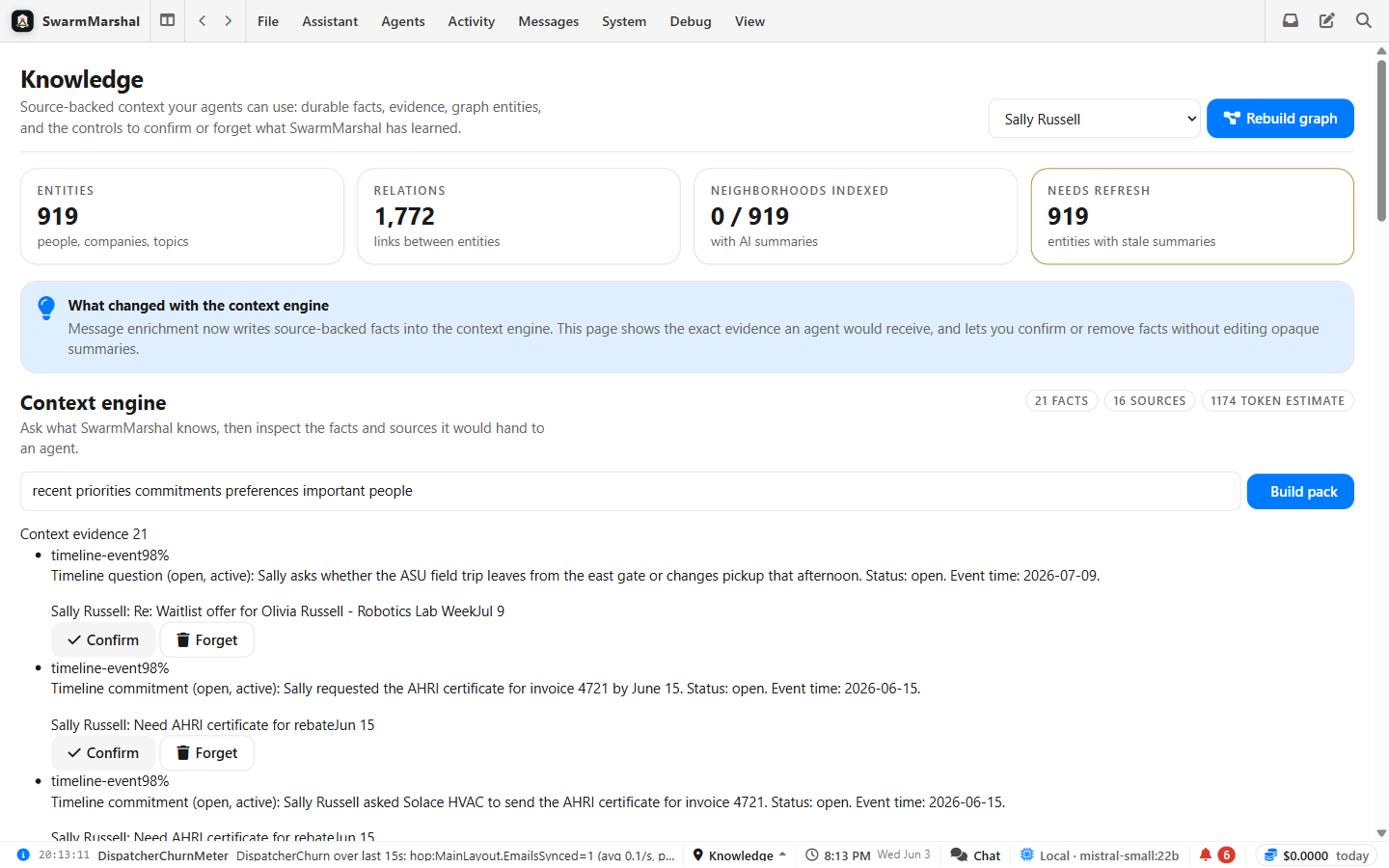
Knowledge browser

Knowledge browser

People, promises, decisions, and relationships extracted from your own history — each linked back to the source message.

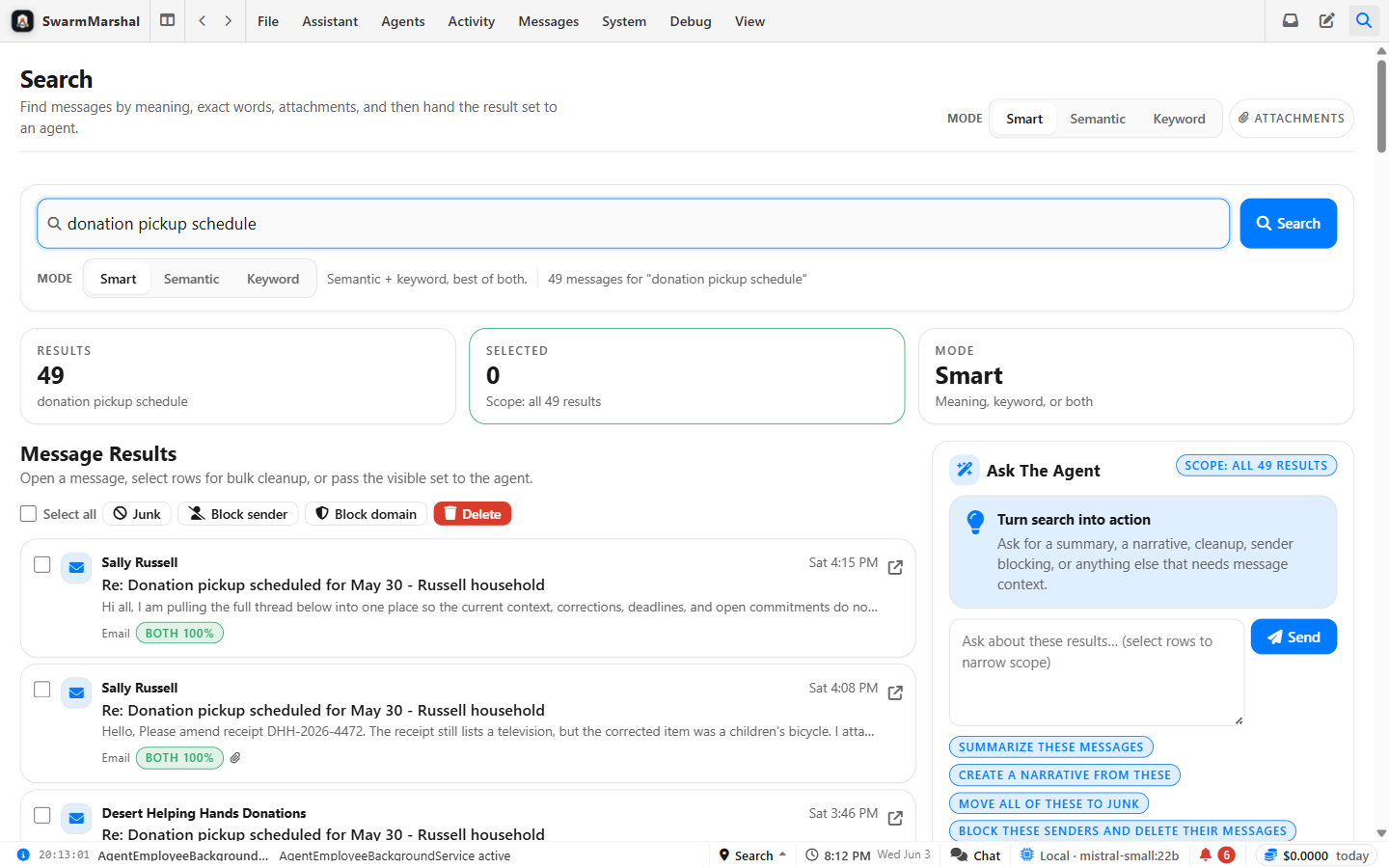
Search by meaning

Search by meaning

Find the message even when you don't remember the exact words — semantic and keyword search across every channel.

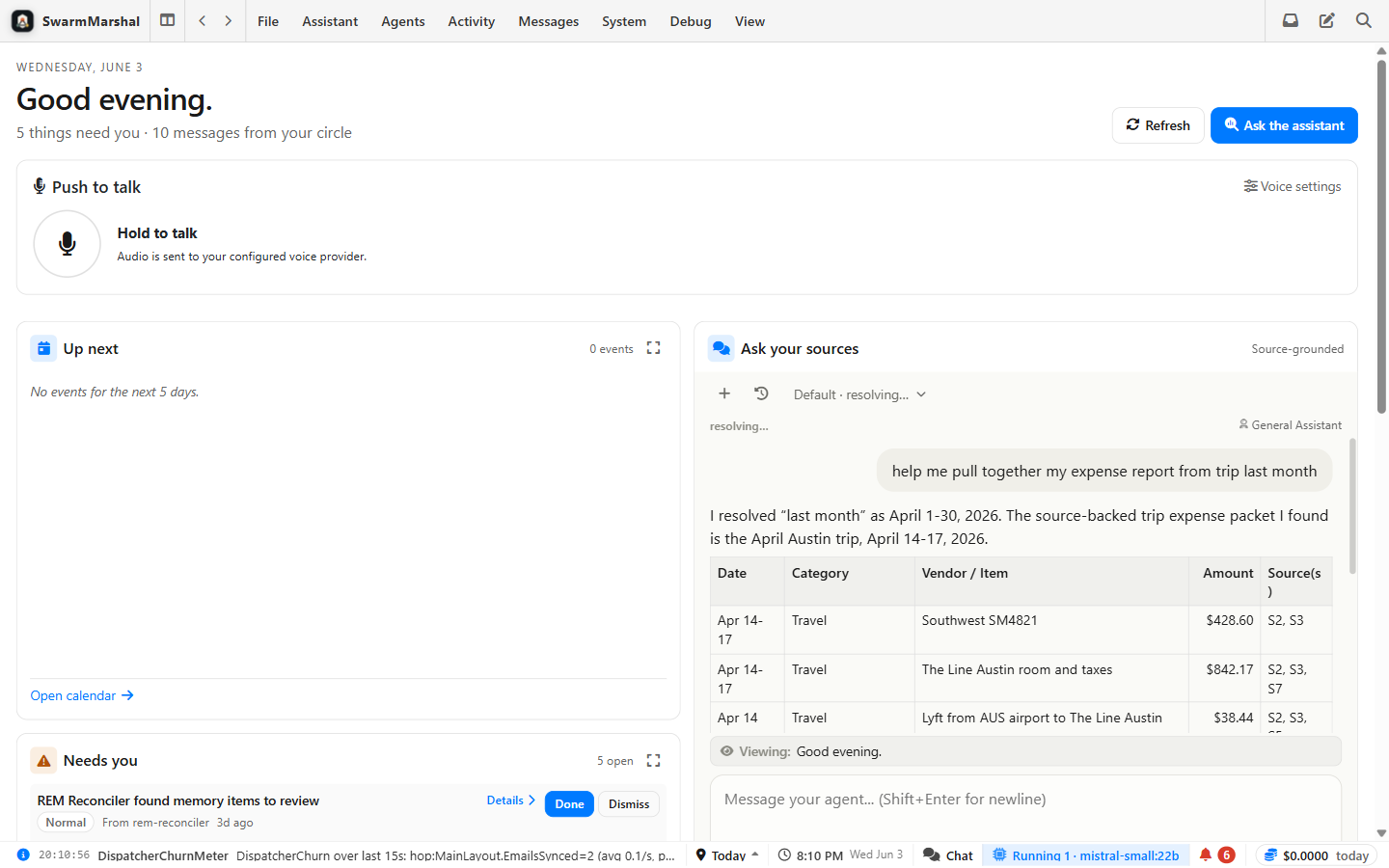
Today

Today

Your daily dashboard: what changed, who's waiting, deadlines, and what needs your attention — with sources behind it.

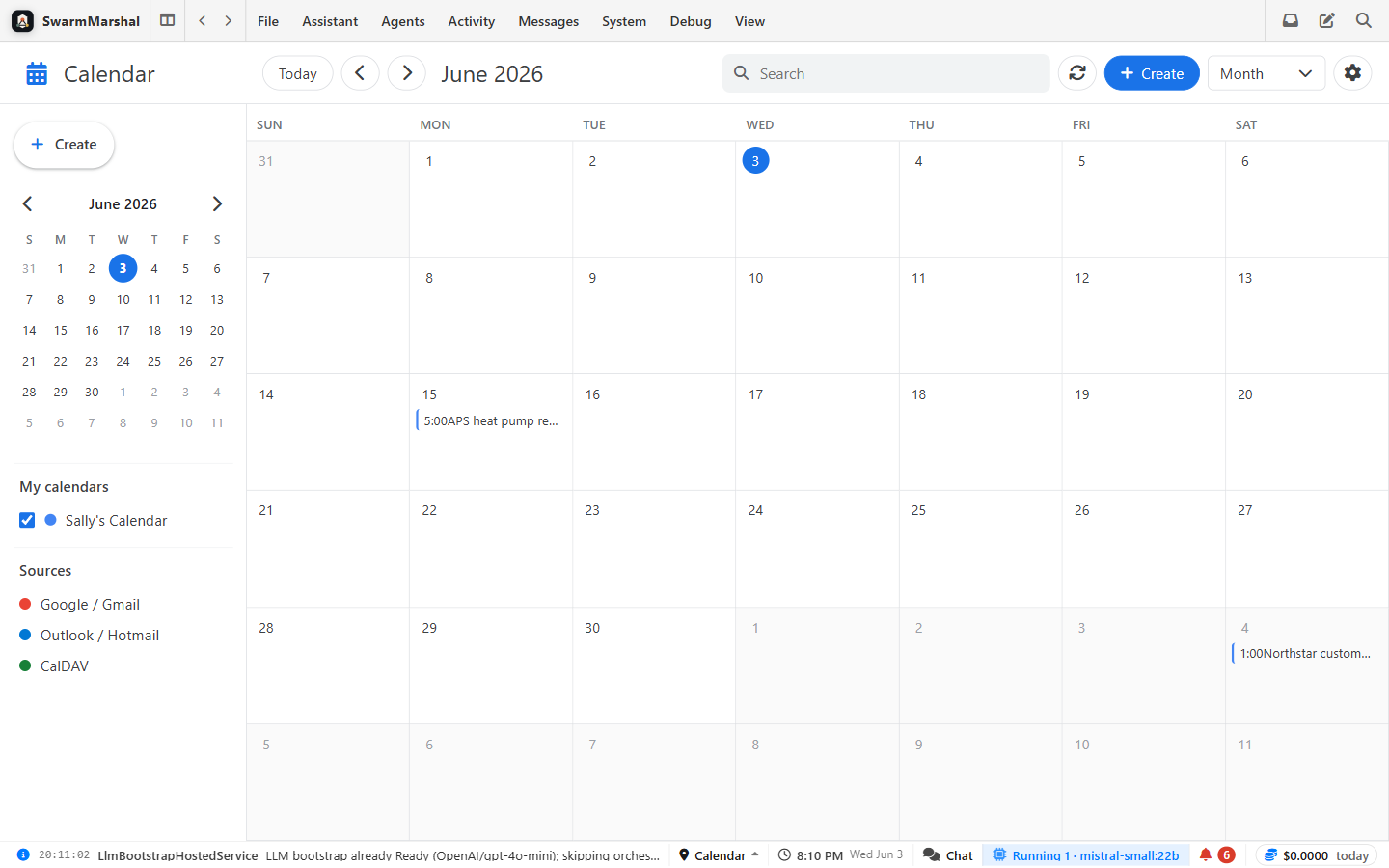
Calendar & commitments

Calendar & commitments

Google and Microsoft calendars, plus deadlines and promises pulled from email — still linked to the message they came from.

Full gallery →
For builders

Already have an agent? Point it at your messages.

SwarmMarshal ships a built-in MCP server, so Claude Code, Codex, or your own agent can query your communication history the same way you do — source-grounded, with citations, behind an explicit approval gate. It's a capability, not the whole pitch.

Free to try

Install it, connect your accounts, and ask your first question.

Download SwarmMarshal, connect your Gmail / Microsoft / IMAP accounts, and start having a conversation with the history you already have — every answer linked back to the real message.